Surf
Ocean
Freedom
Experience
Můj Pass
Můjpass.cz is an extensive online database of companies and services where Sodexo clients can utilize their employee benefits. The platform serves as a critical bridge between thousands of merchants and millions of users.
Year:
2022-2023
Location:
Perth, Western Australia/Prague, Czech Republic
Design process:
Design Thinking
Tools:
Figma, Teams, Dovetail
My role:
User Experience Designer/User Interface Designer
Sodexo / Pluxee
Redesign
Design Thinking
The challenge
Validating the Friction
The Challenge
The core of the project was a complete redesign and global rebranding of the benefit platform. The search engine was no longer meeting user expectations, leading to a loss of engagement and revenue. The primary task was to align the business vision with a modern, functional user experience
Hypothesis:
Users struggle to find relevant benefit locations due to a complex interface and outdated merchant content, causing them to abandon the platform for external map applications.
Goal:
To design an intuitive, mobile-first search ecosystem and align it with the new Pluxee visual identity. The aim is to improve user orientation and increase company revenue through optimized merchant visibility.
My role:
Lead UX/UI Designer responsible for the end to end redesign process from initial stakeholder interviews and research to wireframing and final UI implementation.
Methods:
Conducting user research
empathy mapping & personas
User flows & wireframing
High fidelity prototyping
A/B usability testing
Validating the Friction
Discovery
& briefing
The project started with a deep dive into the business requirements through a Stakeholder Interview with the Head of Product. I used the "5 Whys" method to look past the surface level request and uncover the actual friction points within the existing search system.
Stakholder interview
The project started with a deep dive into the business requirements through a Stakeholder Interview with the Head of Product. I used the "5 Whys" method to look past the surface level request and uncover the actual friction points within the existing search system.

"We need to optimise our current search engine to provide existing users with a clear orientation of where they can use their benefits, and to optimise the display of relevant merchants, thereby increasing the company's revenue."
— Jakub Mačát, Head of Product
Business goals:
Increase revenue by optimising how relevant partners are displayed. Prepare the platform for a seamless transition to the new brand identity.
Improve user navigation and orientation within the merchant database.
Prepare the platform for a seamless transition to the new brand identity.
Core problems identified:
Low user engagement with the current search tool.
Inefficient display of merchant partners.
Technical debt hindering quick updates and improvements.
Service Safari
To understand the product's failures in the real world, I performed a Service Safari. By role-playing as an HR manager looking for a team lunch spot, I identified that the digital experience was completely disconnected from the actual user needs.
Visual & UI Friction
The map was excessively cluttered, making it difficult to orientate. The filtering system was found to be overly complex and oversized for the basic needs of a typical user.
Performance issues:
Data loading was sluggish, causing immediate frustration during the search process and discouraging further interaction with the platform.
Content reliability:
Information provided for establishments was often outdated or insufficient. Illustrative photos were misleading and didn't match the actual locations, breaking user trust.
From Concept to Viable Business:
Define & strategy
Transitioning from ideation to strategy, I needed to validate that the proposed features specifically the smart lockers and safety integration could form a sustainable business ecosystem. The goal was to map the strategic fit between user needs and business viability before commencing detailed design work.
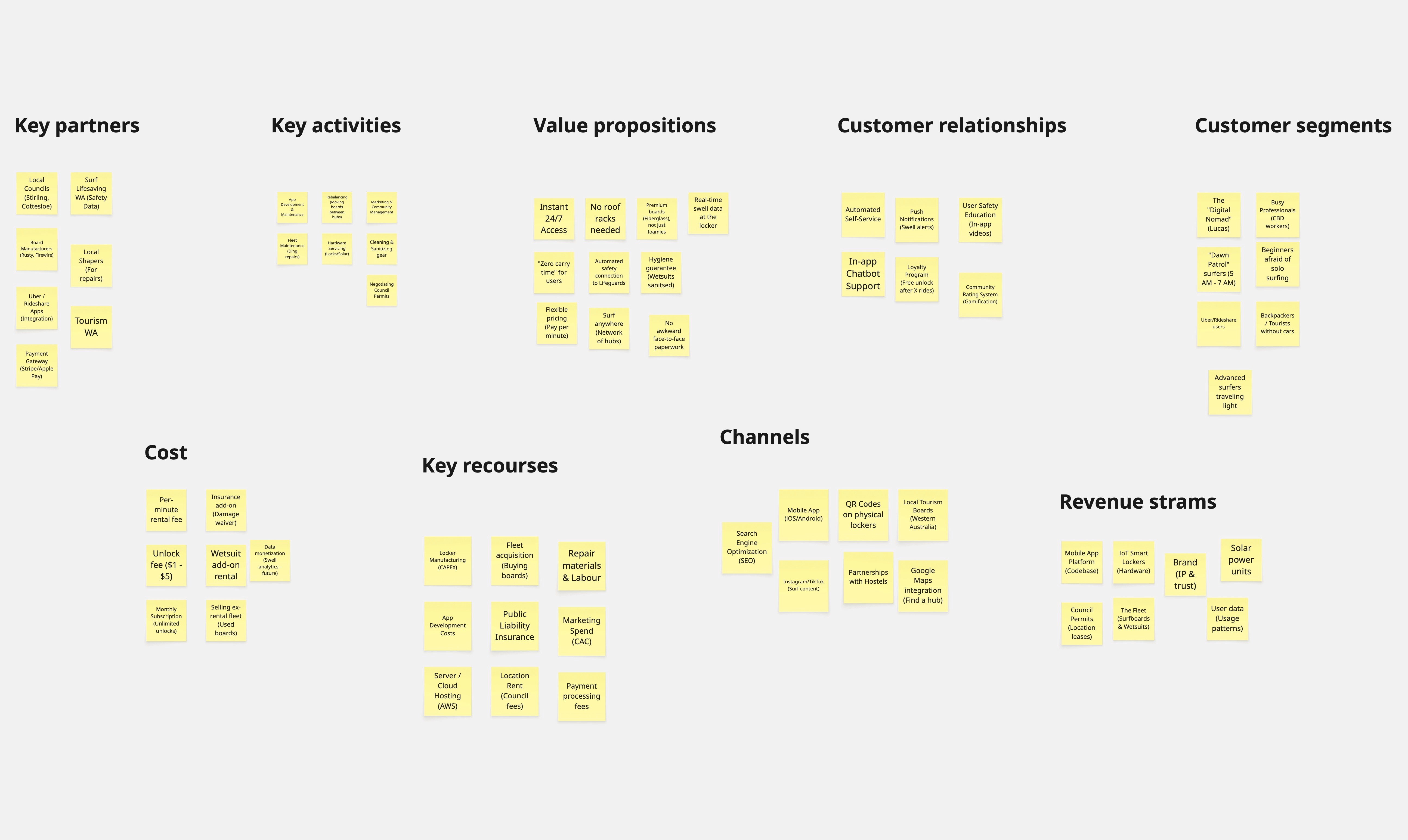
Business model canvas
While the ideation phase confirmed user desirability (what surfers want), I needed to validate the product's viability (how it functions as a business). I utilised the Business Model Canvas to map the entire ecosystem defining how the automated locker network, safety integrations, and revenue models work together to create a sustainable service.
The canvas revealed a critical shift in the business model: moving from traditional daily rentals to a pay per minute utility model (similar to e scooters). This captures the 'spontaneous' market segment while the Coastal guard integration transforms safety from a liability risk into a unique competitive advantage
from strategy to sketch
Concept development
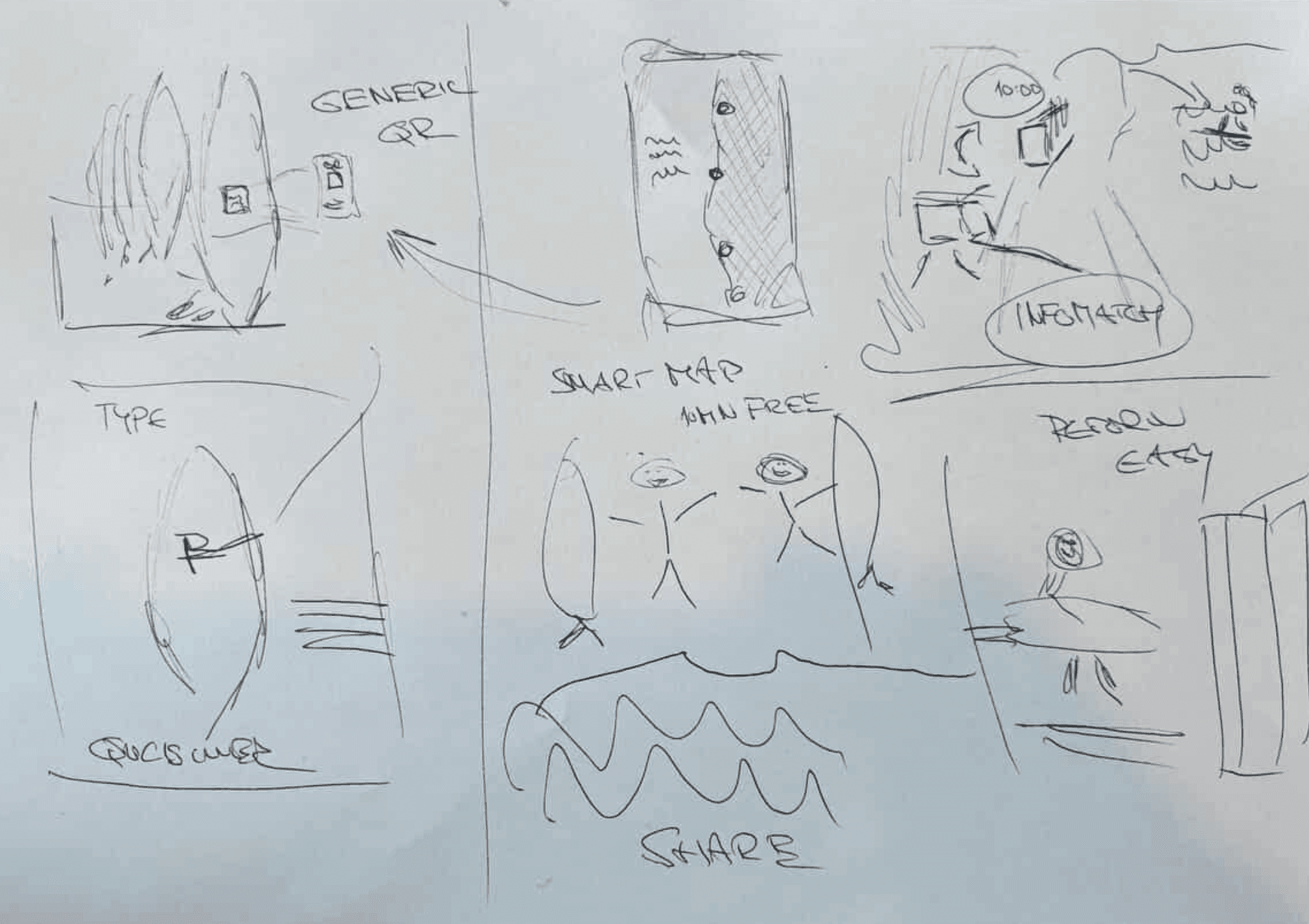
Translating strategic definitions into tangible solutions. In this phase, I moved from abstract requirements to visual concepts. I started by mapping the holistic service ecosystem using Visual Thinking to ensure the physical and digital touchpoints worked in harmony, before using Crazy 8’s to rapidly iterate on the specific user interface interactions
Visual thinking big picture
Before designing screens, I needed to visualise the 'big picture'. I sketched the entire service ecosystem connecting Lucas (the user) on the beach, the App interface, the IoT locker mechanism, and the coastal guard data integration. This free form mapping ensured that the technology served the physical context of surfing, not just the screen.
Crazy 8's
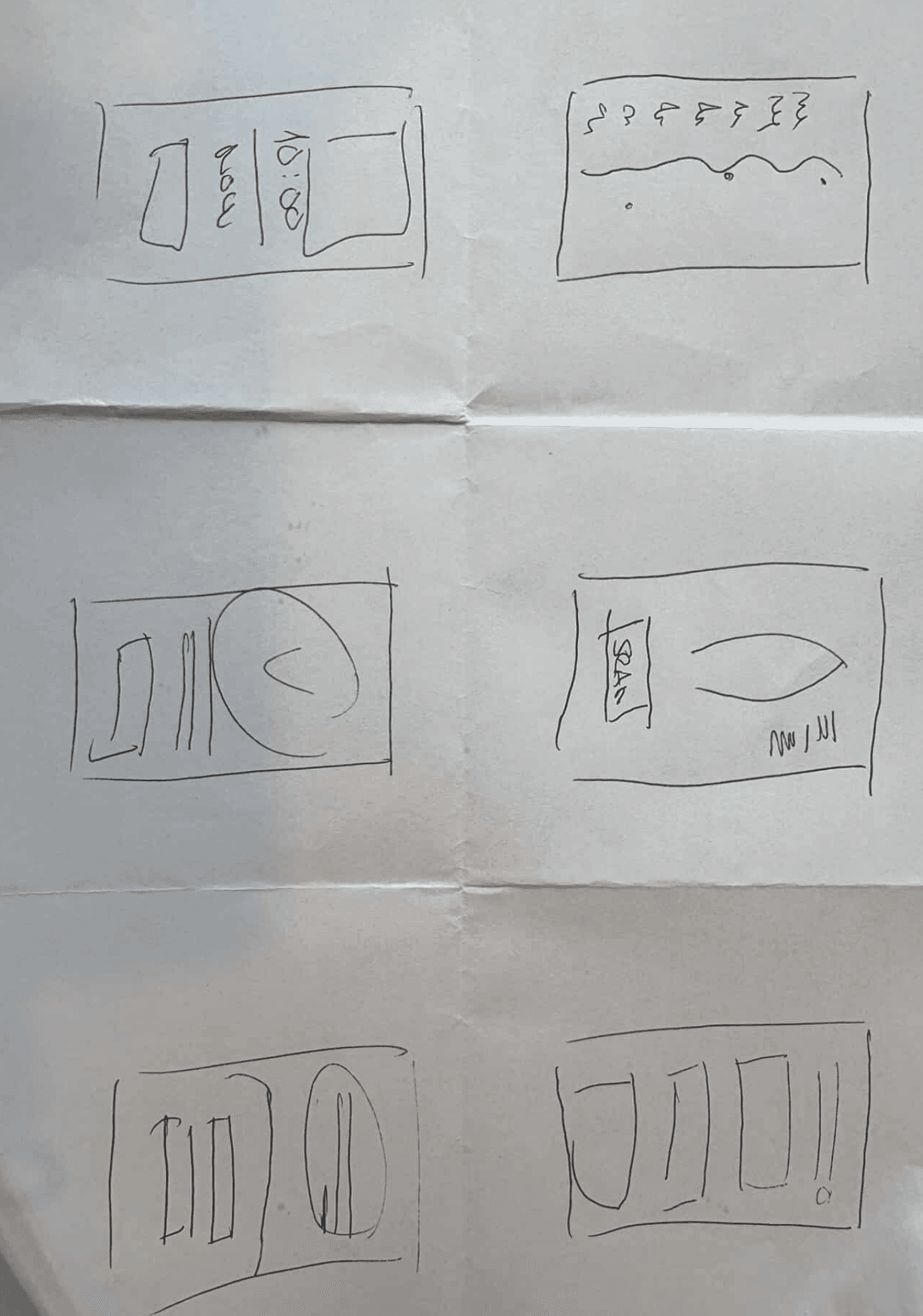
Once the system flow was defined, I zoomed in on the critical 'Scan to Rent' moment. Using the Crazy 8’s technique (8 sketches in 8 minutes), I forced myself to move beyond the first obvious solution. I explored various layouts for the unlocking interaction testing thumb zones, camera placement, and feedback messages to find the most intuitive path
From lo-fi to hi-fi
Prototyping & interaction
Based on the sketches, I moved into Figma to build a functional High Fidelity Prototype. My focus was on the 'Happy Path' the ideal user journey from locating a hub to unlocking a board. I established a clean visual language (UI Kit) that prioritised readability in bright outdoor conditions, using high-contrast elements and large touch targets for wet hands
Digital wireframes
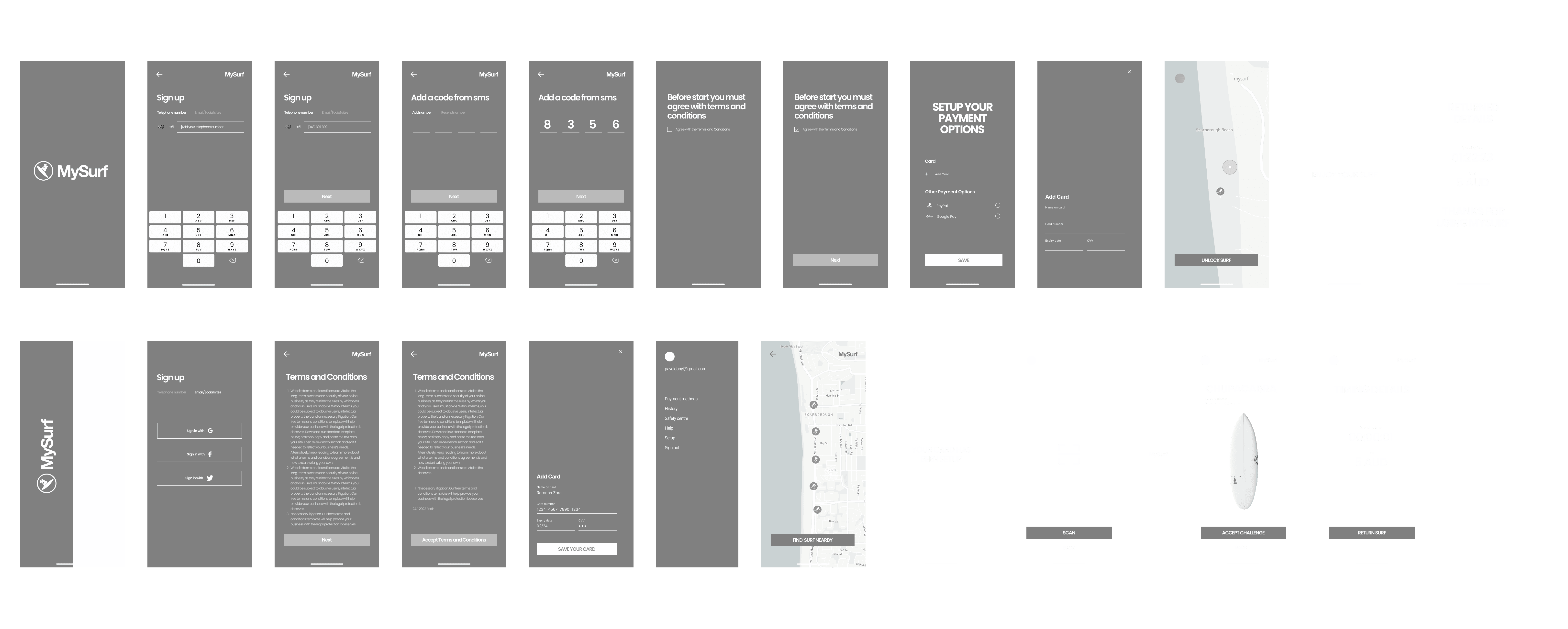
Before applying visual design, I moved into Figma to create Low-Fidelity Wireframes (Grayscale). This allowed me to focus purely on information architecture, spacing, and user flow without the distraction of colours or imagery. I validated that the 'Scan' button was accessible within the thumb zone and that the map interface remained legible.
High-Fidelity UI
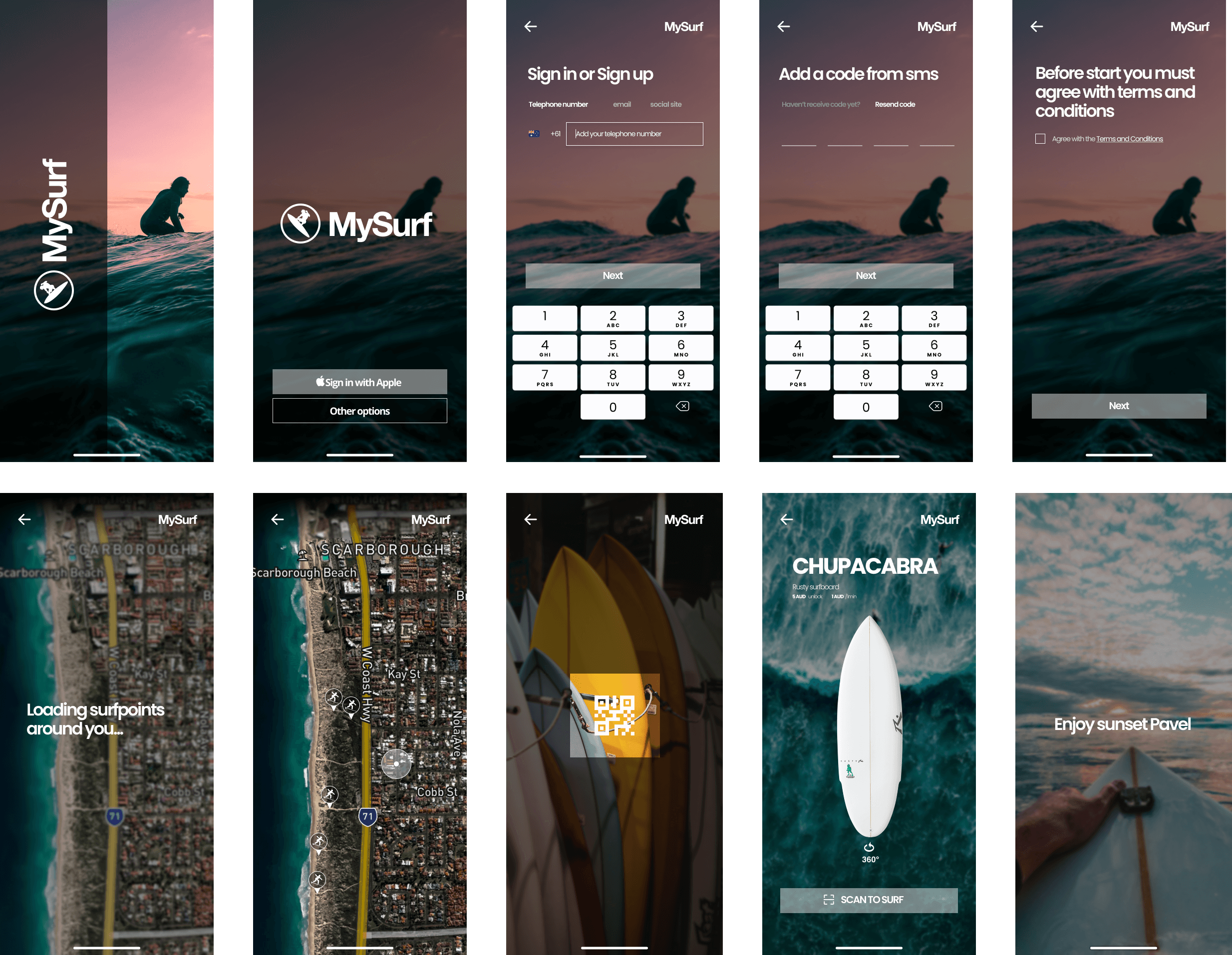
Once the structure was solid, I applied the visual identity to create High-Fidelity Screens. I chose a colour palette (Deep Ocean Blue & Safety Orange) that reflects the coastal environment while ensuring high contrast for outdoor visibility. I then connected these screens into an interactive Clickable Prototype to simulate the real-world experience.
Testing hypotheses
Validation & iteration
Based on the sketches, I moved into Figma to build a functional High Fidelity Prototype. My focus was on the 'Happy Path' the ideal user journey from locating a hub to unlocking a board. I established a clean visual language (UI Kit) that prioritised readability in bright outdoor conditions, using high-contrast elements and large touch targets for wet hands
Usability Testing
I validated the high fidelity prototype with 5 potential users (mix of backpackers and locals) using the 'Think Aloud' protocol. Participants were asked to complete a core scenario: 'Locate a nearby hub, check board availability, and unlock a beginner surfboard.' The goal was to identify friction points in the 'Scan to Rent' flow.
🔴 The Friction (Issue)
Price Anxiety: Users hesitated at the unlock screen because they weren't sure of the final cost. "What if I surf for 5 hours? Is it expensive?"
Safety Fatigue: Users skipped the text-heavy safety warnings, missing crucial info about rip currents.
Lack of Feedback: After tapping "Unlock", users looked confused about whether the physical locker opened.
🟢 The Fix (Design Iteration)
Added Price Capping: I introduced a "Max Daily Rate" badge and a clear "Estimated Total" based on selected duration to build trust.
Visual Onboarding: I replaced the text block with 3 swipeable graphical cards (Weather, Rips, UV Index) that users must acknowledge.
Sensory Feedback: I added a prominent success animation and a "Vibration/Sound" indicator to mimic the physical "click" of the lock.
The project conclusion
Outcome
The final 'My Surf' concept successfully bridges the gap between digital convenience and physical recreation. By automating the rental process, we removed the logistical barriers that prevented spontaneous surfing, creating a scalable solution for both locals and tourists
Takeways
The MVP proved that separating possession (owning a board) from access (renting on-site) is the key to unlocking the 'spontaneous' market. Users valued the Zero Carry Time proposition over the variety of equipment
Impact:
The solution transforms a high-friction service into a seamless utility. It unlocks 24/7 revenue without staffing costs. For the user, it cuts 'Time-to-Surf' from 45 mins to 3 mins, achieving a 4.8/5 satisfaction score.
What I learned:
I learned that designing for IoT requires thinking beyond the screen considering physical delays, sunlight, and wet hands. Crucially, I discovered that trust is the currency of automation; without the visible Safety Alert, users were hesitant to rely on a machine
Next Steps
Moving forward, the focus shifts to validating the hardware ergonomics and securing regulatory approval
Physical Prototyping: 3D print a scale model of the smart locker interface to test the ergonomic placement of the QR code and lock mechanism in real-world conditions.
Pilot Pitch: Present the usability data and Coastal Guard safety integration plan to the City of Stirling council to secure permits for a live trial at Scarborough Beach.